🚀 Overview
What CNG Hub is, and how to start in 3 steps.
CNG Hub is the global app for drivers who run on Compressed Natural Gas (CNG). It brings every CNG station together on a single map, with prices reported and confirmed by the driver community — so you know where to fill up cheaper before you leave.
🗺️ The map and the pins
How to read the map at a glance.
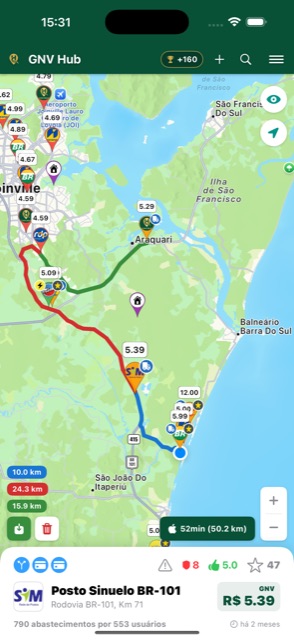
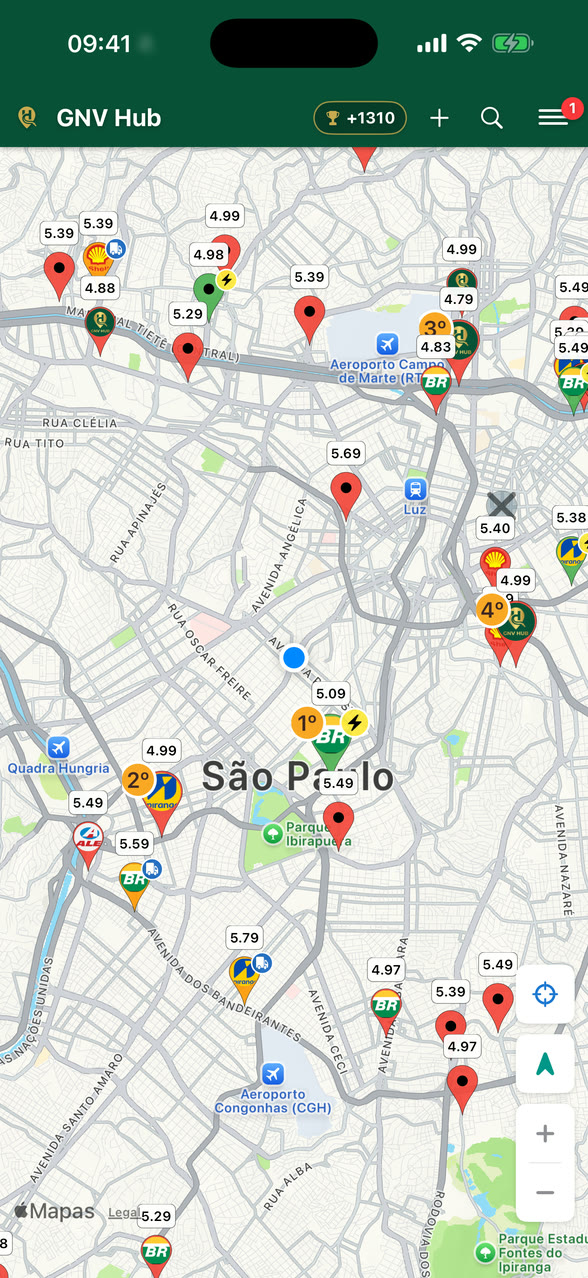
Each pin is a station. Inside the circle you see the brand logo, and above it the white bubble with the price. The body colour and the shoulder badges tell you the rest without opening anything:


🏷️ Station labels
Tap a pin and the bottom bar shows what the station offers:
 Fast fill — high-flow compressor, fills quickly.
 Heavy vehicles — access and clearance for trucks and buses.
 CNG Pipe — refuelling straight from the pipeline.
 LNG — liquefied natural gas, for heavy fleets.
 Credit / Debit — payment methods accepted.
The price colour / opacity shows how fresh it is: the more recent the last update, the more prominent. Stations with no activity for a long time lose the highlight (see the FAQ "my station disappeared").
🏆 Recommended stations
The app points out the best options where you are — and tells you why.
Seeing dozens of pins on the map doesn’t answer the question that matters: where is it worth refuelling right now? The app does that math for you and marks the best stations with a bigger pin and a numbered badge — 1st, 2nd, 3rd. Tap the pin and the bottom bar explains, in one line, what put that station in the spotlight.
What goes into the calculation
- The price — and how recent it is. A cheap price from three months ago helps nobody.
- The station’s trust — how much the community confirms that the place delivers what it promises.
- The distance — not as a straight line on the map, but what it actually costs you.
You choose the priority
In Settings → Best stations near you you say what matters most to you today, and the highlight changes right away:
- ⚖️ Balanced — weighs everything: price, how recent it is, trust and distance.
- 💰 Cheapest — the lowest total cost, already counting the fuel for the trip.
- 🛡️ Most trusted — the stations the community confirms the most, even if a bit pricier.
- 📍 Closest — for when you’re in a hurry or nearly empty.
And if you prefer the map with no highlights at all, one switch turns the feature off on this device.
What is never highlighted
Recommending means sending people there, so the app is deliberately conservative. Left out:
- A station with an old price — the app would rather not recommend than recommend on stale information.
- A station reported as out of CNG or closed at this hour.
- A station the community has not confirmed yet, including new listings still under approval.
🔍 Finding a station
Three ways to get where you want.
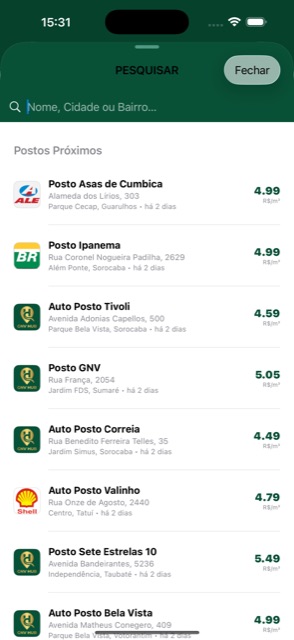
- Nearby stations — the list opens already sorted by your location, with the price and how long ago it was updated.
- Search — type a name, city or neighbourhood to jump straight to the station.
- Favourites — star the ones you use most and find them in one tap.
The 🔍 icon in the top bar of the map.
📍 The station screen
What each button does — and where it is.
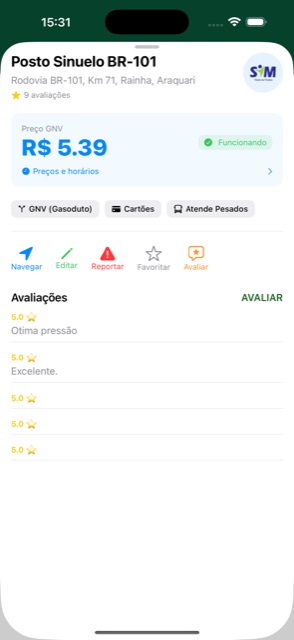
Tapping a pin brings up the station card at the bottom of the map. Tap the price to update it and the name to open the station screen. For more map, swipe the card down: it shrinks to the logo, the name and the price. Swipe up, or tap it, and the card comes back.
The station screen shows the CNG price, the Operating status, Prices and hours, and the station labels (CNG type, cards, heavy vehicles). Just below, the action bar:
- 🧭 Navigate — opens the route in your navigation app (Waze / Google Maps, as you prefer).
- ✏️ Edit — correct the details and update the price and opening hours.
- ⚠️ Report — flag that it has closed (temporarily or for good).
- ⭐ Favourite — save the station.
- 💬 Review — rate it and leave a comment.
Tap any pin on the map or any search result.
🛡️ A station’s trust
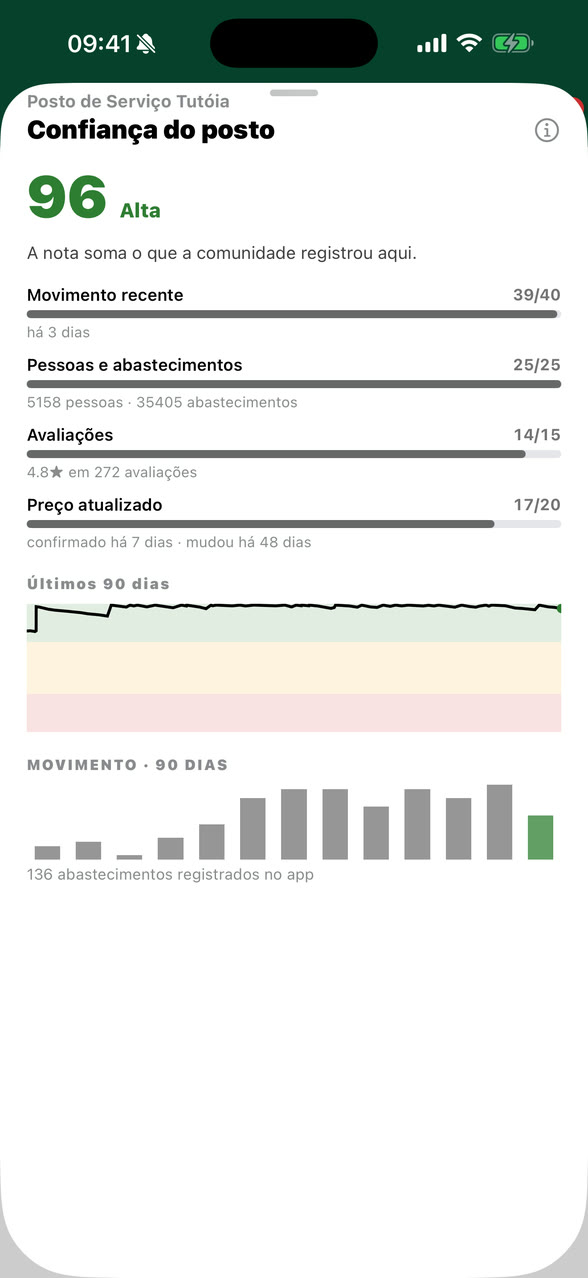
A number from 0 to 100 that sums up what the community knows about that place.
Next to the price, in the station bar, there is a shield with a number. It answers one simple question: how much can I trust this information? Tap the shield and the app opens the whole calculation — every part, with the fact behind it.
Where the number comes from
- How many different people refuelled there and recorded it in the app. Many people confirming counts for more than one person insisting.
- Recent activity — if the station keeps receiving drivers, it is alive.
- Price kept up to date — how often the value is confirmed by someone who was there.
- The ratings from people who refuelled there, with the stars and the comments.
- Closure history — if the community has already closed the station, that weighs against it. But not forever: the weight fades with time, and a station that is working well again recovers its score.
The sheet also shows how the score has evolved and refuels per week, so you see the trend instead of just a bare number. And it is this same score that helps decide the recommended stations.
🛣️ Routes and stops (multi-stop)
Draw the route, pass by other stations on the way and let the app suggest where to fill up on long trips.
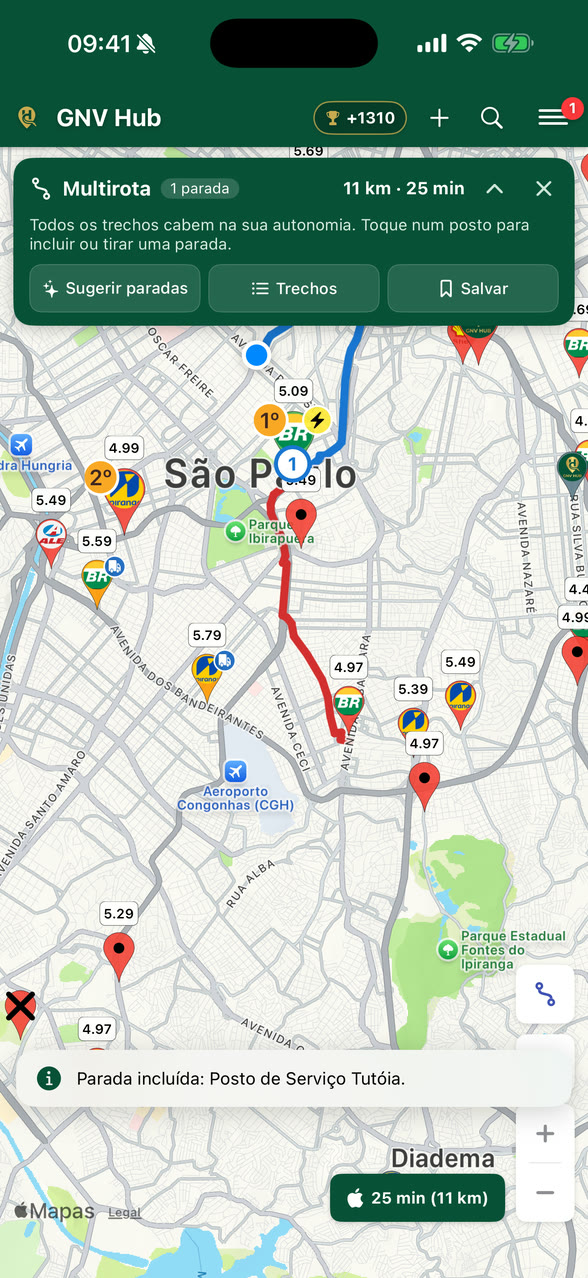
Tapping a station draws the route to it. When the trip passes by other stations, it becomes a multi-stop trip: the app puts the stops in order along the way, checks each leg against your car's range and warns you about anything that could get in the way — all in a bar at the top of the map.
🧭 Step by step
- Draw the route: tap a station. The app draws the route to it and shows the station card.
- Add a stop: with the route on screen, tap another station. The card gets two buttons: “+ Stop” passes by that station on the way to the destination, and “Go here” changes the destination.
- Shortcut: hold a station's pin to add it straight away as a stop. With no route on screen, holding a station — or any point on the map — starts a multi-stop trip to it.
- Up to 8 stops: each one gets a number on the map, in the order it comes along the way.
- Navigate: tap the navigation button at the bottom, which shows the trip's time and distance.
📌 The bar at the top
During a multi-stop trip, a bar at the top of the map sums it up: Multi-stop, how many stops and the total by road (distance and time). The middle line tells you the next step or shows a warning. Below it there are three buttons:
- “Suggest stops” — the app picks where to fill up.
- “Legs” — the trip piece by piece.
- “Save” — keeps the route under a name.
The bar's ✕ ends the multi-stop trip and goes back to a simple route to the same destination. The ^ shrinks the bar to a single line to free up the map; swiping the bar up does the same. Tap that line, or swipe it down, to open the bar again. With a simple route, tapping an empty area of the map clears the route.
👆 Tapping a station during a multi-stop trip
During a multi-stop trip, tapping a station doesn't change the trip: it shows up in the bar itself, with the price, the confidence and the warnings for this trip — and, if there is already a stop nearby, how far away it is. From there you choose “+ Stop” (or “+ Stop anyway”, when there is a warning), “Remove stop”, if it is already a stop, or “Details”, which opens the station's full card.
✨ “Suggest stops”: the app picks where to fill up
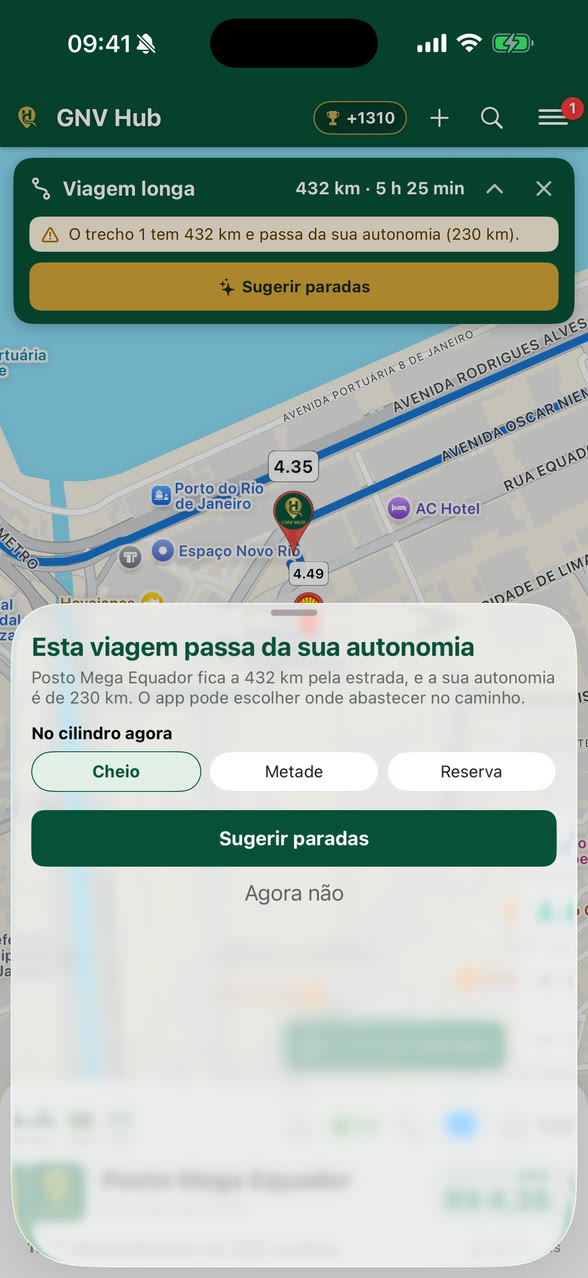
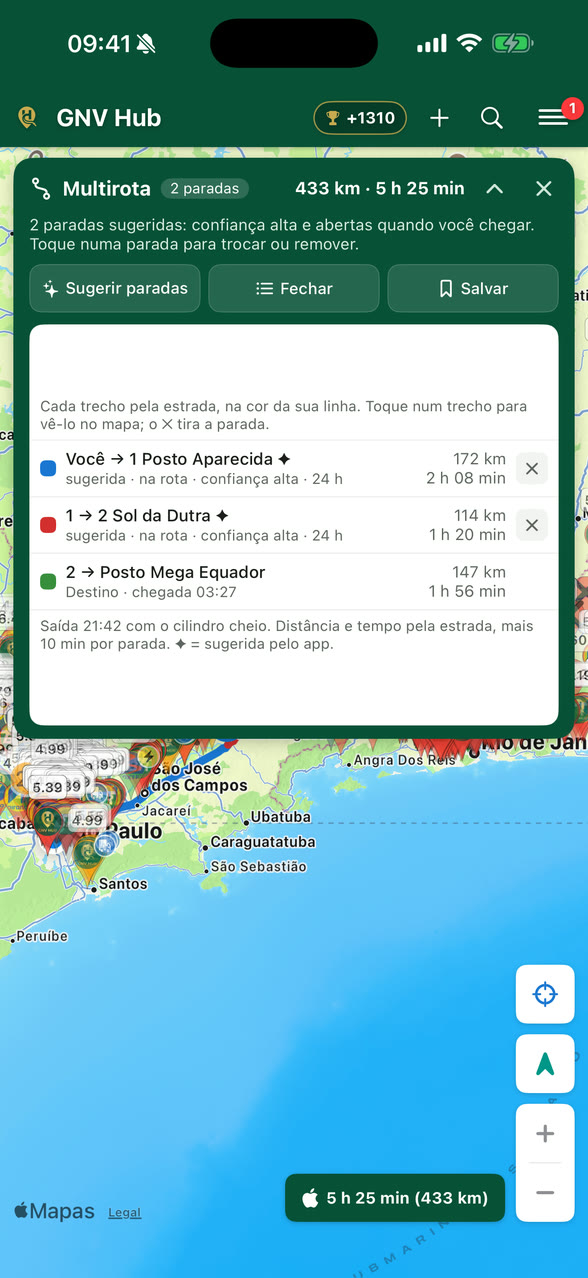
Tap “Suggest stops”, check the car's CNG range — how many km it runs on a full cylinder — and say how the cylinder is now: Full, Half or Reserve. The app picks stations near the route before the gas runs low, preferring high confidence, recent prices and stations open when you arrive.
- The stops you chose that still work stay; the app only adds the ones that are missing, marked with ✦. They are normal stops: change or remove them whenever you like.
- A station on the route comes first. A station off the route or across a divided road only gets in when there is no option on the route — and it shows the detour.
- If the whole trip fits your range, the app tells you no stop is needed.
- Searched for a destination beyond your range? The app asks on its own: “This trip goes beyond your range”. Choose the cylinder level and tap “Suggest stops” — or “Not now”, and the Long trip bar keeps warning you.
⚠️ The warnings
The app checks every leg and every stop on its own and warns you in the bar and in the list of legs, always with the number behind it:
- Out of range — the leg goes beyond your range. It is dashed on the map from the point where the gas would run out, and “Suggest stops” is highlighted.
- Closed when you arrive — the station will be closed at your expected arrival time (e.g. “closes at 22:00, you get there at 22:40”).
- Across the road — on a divided road, it may require a U-turn; the warning shows the detour.
- Old price — the price was reported many days ago; check it when you get there.
- Open report — someone reported that the station is out of CNG.
You may also see low confidence, a new station not yet confirmed by the community and off the route, with the detour in minutes. A warning doesn't remove the stop: the decision is yours.
📋 Legs: the trip piece by piece
Tap “Legs” to open the list in the bar. Each leg has the colour of its line on the map, goes from one stop to the next and shows distance and time by road, never as the crow flies. Underneath comes what matters about the station (e.g. “on the route · high confidence · 24 h”), and the ✕ removes the stop. The footer shows the assumptions: departure time, cylinder level and the time added per stop.
- Tap a leg: the bar shrinks to a single line and the map shows only that leg.
- On that line, the arrows ‹ › move to the previous or the next leg, and the map follows.
- Tap the line, or swipe it down, to open the whole bar again (on Android, the Back button does the same).
🎯 See the whole trip and your location
Above the zoom there is a single button, and it always shows the next step. With a route on screen, it frames the whole trip, also after looking at a single leg. With the trip framed, it turns into the crosshair: My location centres the map on you. Move the map and it offers the trip again. To go to the destination, use the “Legs” list or the arrows on the line.
💾 Save and reopen
Tap “Save” and give the route a name. It goes to the menu — My Trips on Android, My Saved Routes on iPhone — and, when you open it, the trip starts again from wherever you are, with the same stops. Saved routes stay on the phone only.
🚗 Navigating stop by stop
The navigation button opens the trip in your preferred navigation app, chosen in the settings. Google Maps follows all the stops at once. With Waze (or Apple Maps, on iPhone), the app asks: “Use Google Maps” for the whole trip, if it is installed, or “Go stop by stop”.
Stop by stop, the bar shows “Stop 1 of 2 · station name”, how far is left and what comes next, and your navigation app takes you to the first stop. When you leave it, tap “Next stop”; on the last one, “Finish”. The ✕ leaves stop-by-stop mode.
⛽ Automatic refueling and permissions
When you stop at a CNG station, the app notices on its own and asks if you refueled, even with the screen off.
🧭 How it works
- You arrive at the station. The app notices on its own. There is nothing to open.
- You stay 7 minutes. That time is what separates refueling from just passing by. Left earlier? Only a pass by the station is recorded.
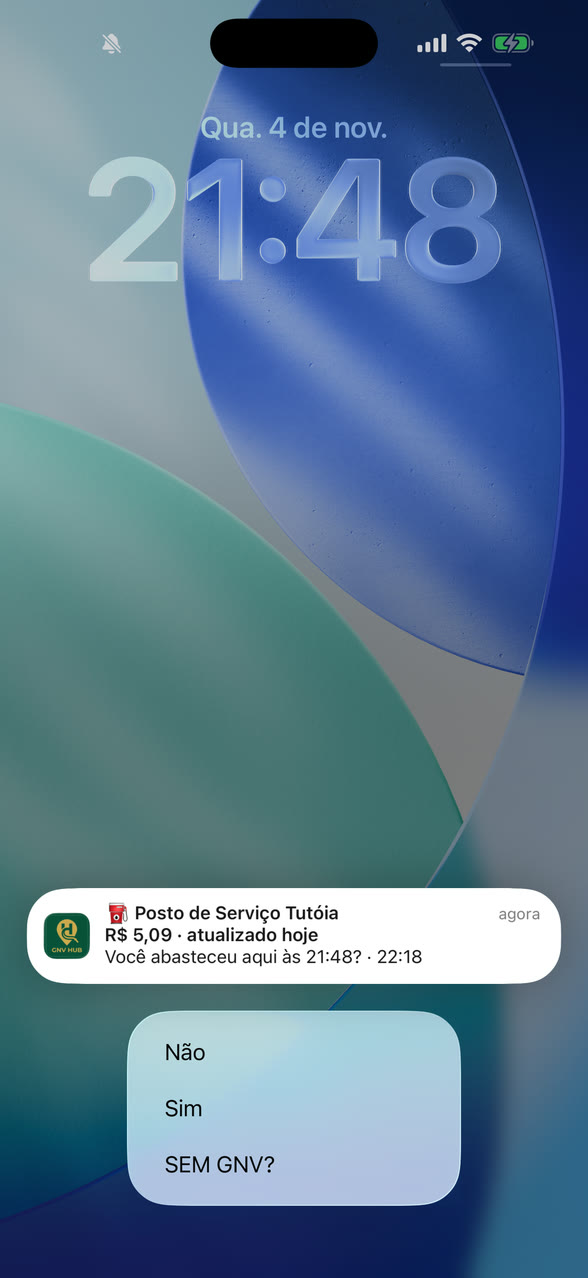
- The app asks: a notification says “Did you refuel here at 14:51?”. Answer right there, without opening the app: Yes or No. Station out of gas? NO CNG? opens the report.
- Done. The refueling goes into the Driver's Logbook, earns XP and confirms the station's price for the community.
At a station with an open report or not yet confirmed, the question becomes “Is there CNG here right now?”, and your answer counts as a community vote.
Don't use your phone while refueling: you have 30 minutes to answer. With no answer, or if you dismiss the notification, the refueling is saved on its own, but without XP and without confirming the price.
Each station takes one refueling every 6 hours, and there is a minimum interval between refuelings at different stations. Before that, the notification tells you from what time the next one counts.
🔐 The permissions
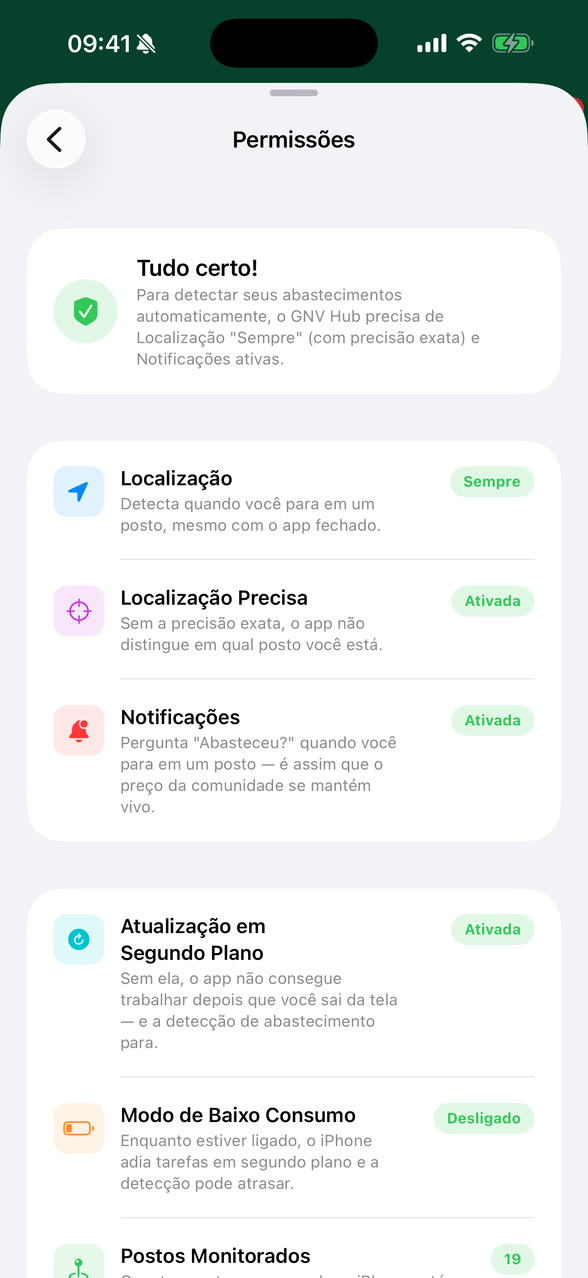
Check everything in the menu, under Permissions. When detection is ready, the screen says “All set!”. There are three items:
- Location set to “Always” — detects when you stop at a station, even with the app closed. On “While using”, nothing is recorded on its own.
- Precise Location — without exact precision, the app can't tell which station you are at.
- Notifications — that's how the app asks. With them off, the refueling is saved on its own, without XP and without confirming the price.
On iPhone, the screen also shows Background App Refresh, without which detection stops, and Low Power Mode, which can delay it while on.
🤔 The question didn't show up?
- Open Permissions and see if everything is fine. That's the most common cause.
- You left before the 7 minutes: only the pass by the station remains.
- You refueled there a short while ago: the next one only counts after the interval.
- The station has to be on the map. If it isn't, add it.
🤝 How to contribute (Public Trust)
The app is built by the community. Every contribution helps another driver — and earns points.
- Confirm / update the price — keeps the value fresh for everyone.
- Review the station — rating and comments on pressure, service, queue.
- Add a new station — one that isn't on the map yet.
- Report — a station that has closed (temporarily or for good), or reopened.
📍 The presence rule — two doors
To earn points and carry public trust, some actions require that you really were at the station. But you don't have to be there right now: opening one of the two doors is enough.
(within the radius)
(within the window)
Door 2 is the one most people don't know about — and the most useful. The app records your visit on its own when you arrive, stay or leave a station, and also when you drive past it. After that you have the whole window to update the price calmly, at home or at work: I saw the sign as I drove by, I'll update it now.
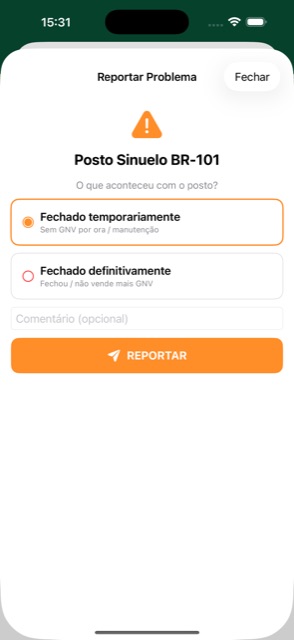
Price: tap the station's price. Report: Station → ⚠️ Report. New station: the ➕ button on the map bar.
A new station joins the map after 4 approvals from the community — collective curation against duplicates and pranks.
🔄 Closed, reopened, and the red X
Stations open, close and come back. On the map, the community decides that — and you are part of it.
When you arrive at a station and there is no CNG, that information is gold for whoever comes next. That's why the app lets you report it — and why a report doesn't close the station on its own: it opens a vote.
🚦 The two kinds of closure
🗳️ What happens after you report
- A campaign opens. The station starts showing the report to everyone who arrives, along with the comments from those who voted.
- Other drivers vote. Whoever is at the station can agree ("there really isn't any") or disagree ("it's working fine").
- The community decides. Once consensus is reached the campaign closes and the station changes state — or goes back to normal, if most people disagreed.
- XP is paid at the outcome. Whoever voted with the winning side gets the points when the campaign closes, not at the moment of the vote. That's why the Logbook shows the entry as "under vote" before it turns into points.
💚 "It's working again" — bringing a station back
A station marked as no CNG isn't stuck that way. When it starts working again there are two paths — and both depend on people who were there:
- The "It's working again" button — on the closed station screen, whoever is there confirms they filled up normally.
- By filling up — confirming a fill-up at a station marked as closed already counts as a vote that it is open. You don't have to do anything beyond what you'd do anyway.
⬆️ Escalating to a permanent closure
If a station has been marked no CNG for a while and you saw on site that it has shut down for good, you can escalate the report under "More options" on the station screen. It is the most serious action in the app: it ends the current vote and opens a new one for permanent closure. That is why it also requires you to be at the station.
🏆 Points & Levels
Every contribution becomes XP. Add up points, level up and earn badges.
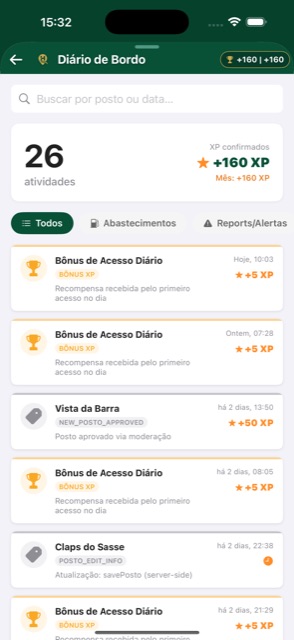
Follow everything in the Logbook: each action appears with the XP it earned, plus the confirmed total for the month.
To update a price, tap it on the station card: the Station price screen opens.
What each action is worth
| Action | XP |
|---|---|
| Confirm a refuel from the app notification | +10 |
| Update the price while confirming the refuel | +15 |
| Update the price from the station screen — while at the station | +15 |
| Update the price from the station screen — within 1000 m | +10 |
| Update the price from the station screen — farther away (you passed by recently) | +5 |
| Add a new station (approved) | +50 |
| Review a station | +5 |
| Report a closed station (confirmed) | +30 |
| Vote on / confirm a report | +10 |
| Daily access bonus | +5 |
Recognition badges
🥇 Monthly ranking & Rewards
The most active drivers of the month get real perks.
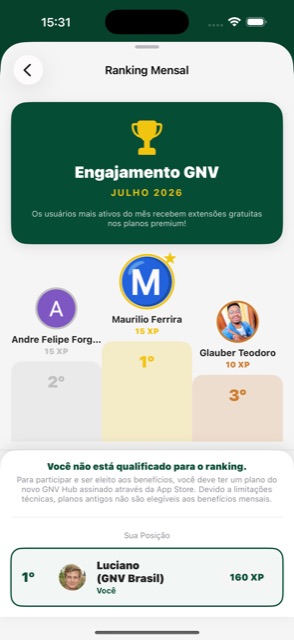
Every month there is an engagement ranking per country. Those who contribute the most can receive free extensions on the premium plan — our way of thanking whoever keeps the map alive.
- Your position appears on the Monthly Ranking screen.
- What counts is the XP earned in the current month.
- To compete for the rewards you need an active CNG Hub plan (a current store subscription).
⚖️ Tie-breaker
If two drivers finish the month with the same XP, the order follows a fixed, public and verifiable rule:
- More XP in the month wins.
- Tied on XP → whoever reached that score first wins (by the date/time of the last action that added points in the month).
- Exact tie (same instant) → an internal identifier guarantees a unique and deterministic order, so it is never ambiguous.
🌎 Passports, Countries & Offline
Access wherever you drive — with or without a signal.
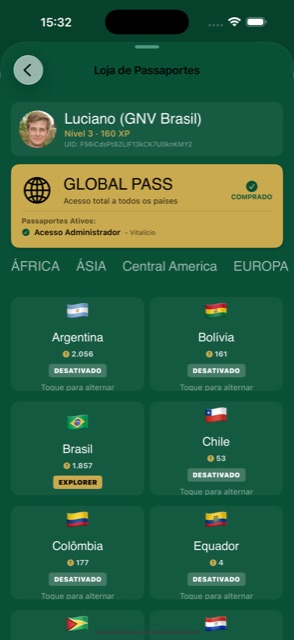
- 🌐 Global Pass — access to every country.
- 🧭 Explorer — access to the country you choose.
- 📴 Offline-first — the data is stored on your device; with no signal on the road, the map keeps working.
- Manage your subscription — cancelling or switching plans is done in the store itself (App Store / Google Play), starting from My Passports in the menu.
⚖️ How the community decides
Public trust in action — fairly and transparently.
Decisions about a station (is it open? did it close? is the price real?) come from the community consensus, not from one person:
- Several drivers confirming the same price → the value gains confidence.
- Closure reports pile up → the station is flagged.
- If it starts receiving fill-ups again, a station marked as closed comes back to life automatically.
🛡️ Trust
Beyond XP (which only goes up), every driver has a Trust score — how much the community can rely on what you report. It starts full and it is not a competition scoreboard: almost nobody needs to think about it.
- It rises on its own as you contribute information that gets confirmed.
- It falls when you report something the community rejects — for example, reporting a working station as closed.
- It recovers with time and with correct contributions. It is not permanent.
👉 The full walkthrough of reporting, voting and reopening is in Closed & reopened.
👤 Profile, Devices & Privacy
Your account, under your control.
- Profile — name, avatar, level and XP.
- Devices — see the devices connected to your account. Each phone is tied to one account: that's what stops anyone from creating several accounts on the same device to inflate points. Changed phones? The new device takes over normally.
- 13 languages — the app adapts automatically to your phone's language.
- Delete account — available inside the app, at any time.
See also the Terms of Use and the Privacy Policy (available in several languages).
❓ Frequently asked questions
The questions that come up most — answered straight.
I updated the price and got no XP. Why?
My favourite station disappeared from the map (or shows "no price").
I set Waze, but Google Maps opens (or the other way round).
"You are not at the station" appeared and the button was locked.
I reported a station with no CNG, but it's still on the map. Is that wrong?
I voted in a campaign and got no XP right away.
The station is working again. How do I remove the red X?
I added a station and it shows up grey, with no price.
A newly added station comes in as "awaiting approval" — a grey pin — until it receives 4 confirmations from the community. That is the collective curation against duplicates and wrong entries. Tap the station to see its details and price; once approved, the pin becomes normal.Does the app have to be open to detect that I filled up?
How do I compete for the monthly ranking rewards?
I can't access the stations in my country.
Do I have to pay to use CNG Hub?
📲 Get the app
Available for Android and iPhone, in 13 languages.
Questions? suporte@itapox.com